


How to Prevent Ad Blockers from Removing eBay Tracking Links
We are able to offer our services and some upgrades for free because eBay pays us when we refer visitors to their website using our special links.
Some desktop browser extensions can block or change our tracking links and prevent eBay from recognizing our referral.
Test your browser extensions on the eBay website.
Click this test link:
https://ebay.com/?campid=NOT-BLOCKED
Expected result: You should see campid=NOT-BLOCKED in the address bar.
When the eBay page opens, check the address bar for the tracking code.
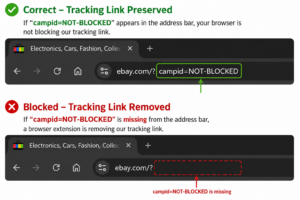
Tracking link missing? Here’s how to fix it.
Instructions for allowing eBay website links in ad blocker extensions
Click on the icon for the ad blocker extension you want to edit.
(If the icon is not visible on the toolbar, you can click the  icon to access the extensions list.)

Google Chrome – uBlock Origin Lite
While on the eBay website, click the extension icon in the browser and select no filtering for eBay.
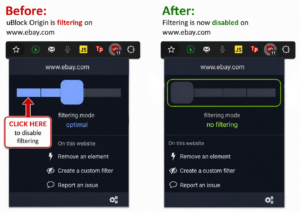
After changing the settings, come back to this page and test again.
Mozilla Firefox – uBlock Origin
While on the eBay website, click the extension icon and click the blue power button to disable filtering for ebay.com.
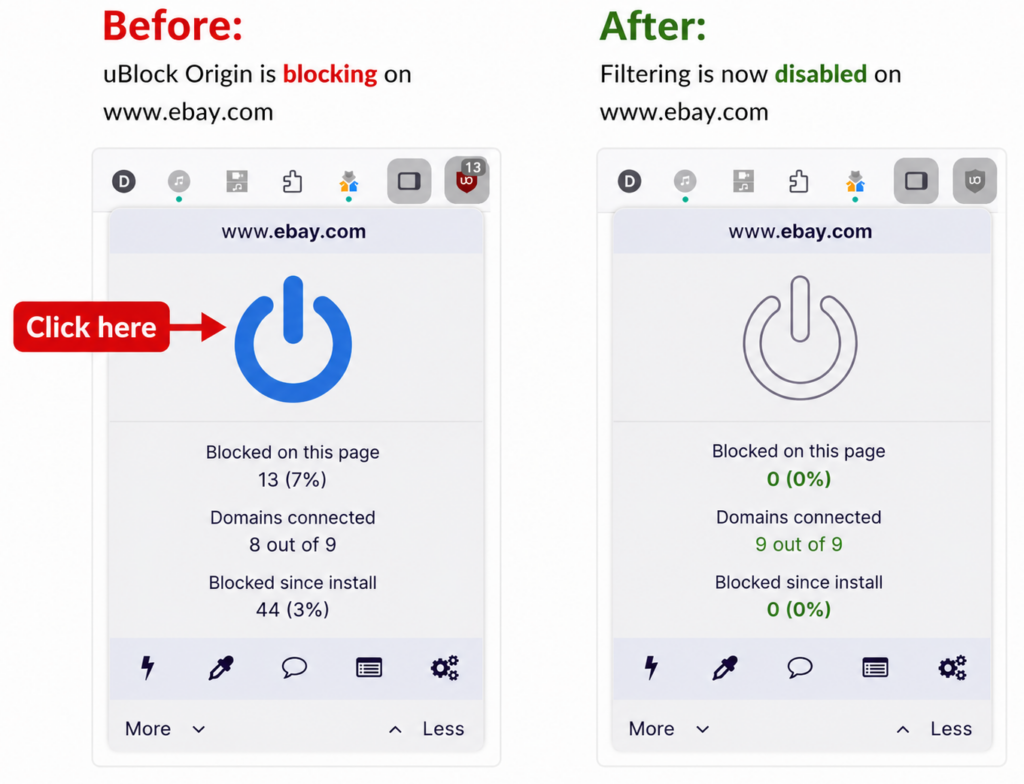
After changing the settings, come back to this page and test again.
Using a different browser extension? The process is usually similar—allow or disable filtering for ebay.com.
AdGuard
Ghostery
Brave Shields
If you found your eBay links being blocked, or have any questions, please let me know.
If you need support with this, Please Contact Me.


